Web Automation: Complete Guide, Tools & Best Practices for April 2026
You open Salesforce, pull up LinkedIn, copy three fields, paste them into HubSpot, then repeat the process for the next lead. Web automation software exists to wipe out these browser-based tasks, but the ecosystem is crowded with frameworks that require Python knowledge, brittle selectors that break when sites update, and cloud solutions that can't access your logged-in sessions. We're cutting through the noise to show you how automation actually works under the hood, which tools fit which scenarios, and where AI-powered approaches are solving the fragility problems that have plagued Selenium scripts for years.
TLDR:
- Web automation handles repetitive browser tasks like CRM updates and data entry automatically
- Workers spend 58% of their time on work about work that automation can eliminate
- Selenium dominates testing with 25-26% market share; Playwright and Puppeteer offer alternatives
- AI agents adapt when sites change using visual recognition instead of brittle code selectors
- Composite runs locally in your browser, accepts plain-English commands, and executes multi-tool workflows
What Is Web Automation and Why It Matters
Web automation is the practice of using software to perform browser-based tasks without manual input. At its core, a script or agent interacts with web pages the same way you would: clicking buttons, filling forms, jumping between tabs, and extracting data. The difference? It runs faster, doesn't get tired, and never fat-fingers a CRM entry.
For knowledge workers like salespeople, recruiters, and product managers, the implications are hard to ignore. Research from Asana's Anatomy of Work Index found that workers spend roughly 58% of their time on "work about work," including status updates, data entry, and toggling between apps. Web automation targets exactly these tasks, handling the repetitive browser workflows that consume hours each week so you can redirect that energy toward strategy, relationship-building, and decisions that actually move the needle.
Whether it's a Python script scraping lead data, a Selenium test suite validating a checkout flow, or a browser extension that auto-fills reports across five SaaS tools, web automation spans a wide range of complexity and purpose. What ties it all together is a simple premise: if a task follows a repeatable pattern inside a browser, software can do it for you.
Core Components of Web Automation
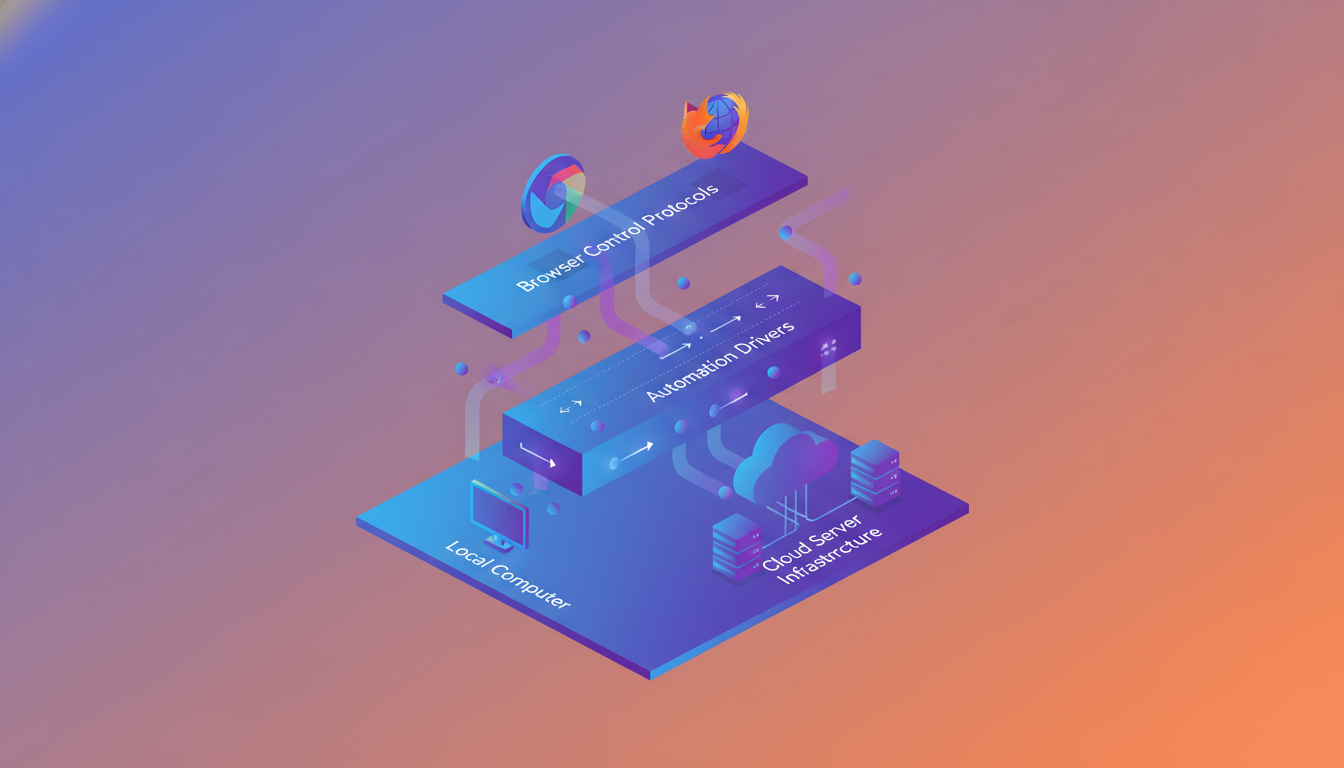
Every web automation setup relies on three interconnected pieces: a browser control protocol, an automation driver, and an execution environment. Understanding how they fit together helps you pick the right tool and debug issues when things break.
Browser Control Protocols
Two protocols dominate. The WebDriver protocol, standardized by the W3C, sends commands to a browser through an intermediary driver (like ChromeDriver for Chrome). It's the backbone of Selenium and similar frameworks. The Chrome DevTools Protocol (CDP) communicates directly with Chromium-based browsers over a WebSocket connection, giving finer control over network requests, console output, and how pages display. Playwright and Puppeteer both lean on CDP.
Automation Drivers
Drivers act as translators between your code and the browser. Selenium WebDriver, for instance, receives a "click this element" instruction from your Python or Java script, converts it into a protocol-compliant command, and relays it to the browser. Without the right driver version matched to your browser version, nothing works.
Execution Environments
Local vs. cloud and headless vs. headed each carry distinct tradeoffs:
- Headed execution opens a visible browser window, useful for debugging and visual verification
- Headless execution runs the browser without a UI, which is faster and common in CI/CD pipelines
- Local execution runs on your own machine, using your existing sessions and cookies
- Cloud execution spins up remote browser instances, offering scale but introducing latency and authentication hurdles
Cloud setups work well for running hundreds of parallel test suites, but they frequently get blocked by anti-bot systems and can't access your logged-in sessions. Local execution sidesteps both of those problems, which is why tools that run inside your existing browser have a practical edge for day-to-day workflow automation.
Web Automation Tools and Frameworks Compared
The web automation framework space is crowded, but four tools capture most of the mindshare. Selenium commands roughly 25-26% of the testing and QA market, with over 55,000 verified companies using it worldwide. That dominance comes from years of community investment and broad language support. Still, newer AI-powered browser agents have closed gaps quickly.
Tool | Languages | Browser Support | Best For |
|---|---|---|---|
Selenium WebDriver | Python, Java, C#, Ruby, JS | Chrome, Firefox, Safari, Edge | Cross-browser testing at scale |
Playwright | Python, Java, .NET, JS/TS | Chromium, Firefox, WebKit | Fast, reliable end-to-end testing |
Puppeteer | JavaScript/TypeScript | Chromium only | Chrome-specific scraping and testing |
Cypress | JavaScript/TypeScript | Chrome, Firefox, Edge | Front-end component and integration tests |
Which one should you pick? If your team writes Python and needs Safari coverage, Selenium or Playwright are your realistic options. If you're a JS-heavy front-end squad focused on Chrome, Puppeteer or Cypress will feel more natural. Language support and browser compatibility tend to narrow the field fast; learning curve and community size break the tie.
One gap all four share: they're built for developers. None of them help a recruiter automate candidate research or let a sales rep sync CRM data across tabs without writing code. That's where browser-native agents that accept plain-English instructions fill a different role entirely.
Business Use Cases Driving Web Automation Adoption
By 2024, 66% of companies had automated at least one business process. That adoption isn't concentrated in engineering departments. It's spreading across every function that touches a browser.
Here's where the ROI shows up most clearly:
- QA and regression testing: automated test suites validate checkout flows, form submissions, and link integrity across hundreds of pages in minutes
- Sales and CRM hygiene: syncing deal updates, enriching contact records from LinkedIn, and auto-filling activity logs across tools like Salesforce and HubSpot
- Recruiting: pulling candidate profiles from multiple job boards into a single tracker, then drafting personalized outreach
- Competitive intelligence: monitoring competitor pricing pages, product changes, and review sites on a scheduled cadence
- Cross-tool reporting: extracting data from analytics dashboards, spreadsheets, and project trackers to compile weekly summaries
What connects these use cases? They're all repetitive, browser-based, and follow predictable patterns. Whether you're a product manager triaging Jira tickets or an ops lead matching data across three tabs, the workflow is the same: open, click, copy, paste, repeat. That's exactly the kind of grunt work automation was built to wipe out.
Building an Effective Web Automation Framework
A framework without structure becomes a maintenance nightmare the moment your test suite grows past a dozen scripts. The goal is to design for change from the start.
Framework Patterns Worth Knowing
- Linear: sequential scripts with no reuse, fine for quick one-offs but terrible at scale
- Modular: breaks pages and actions into reusable components (the Page Object Model lives here)
- Data-driven: separates test logic from test data using external files like CSVs or JSON, so one script covers dozens of input variations
- Keyword-driven: abstracts actions into human-readable keywords, lowering the bar for less technical contributors
- Hybrid: combines modular structure with data-driven inputs, which is where most mature teams land
Practical Design Principles
Start with a clear folder hierarchy: separate your page objects, test cases, utilities, and configuration files. Store environment variables (URLs, credentials, timeouts) in dedicated config files instead of hardcoding them. This alone prevents half the "it works on my machine" headaches.
Integrate with CI/CD early. Whether you're using GitHub Actions, Jenkins, or GitLab CI, hooking your test suite into the deployment pipeline catches regressions before they reach production. Pair that with parallel execution to keep feedback loops short as your suite scales.
Pick a pattern that matches your team's technical depth and your project's complexity. A three-person startup running Playwright scripts doesn't need keyword-driven abstraction. A 50-person QA org running Selenium Java across four products probably does.
AI-Powered Web Automation: The Next Evolution
Traditional web automation breaks when a developer renames a CSS class or moves a button three pixels to the left. That fragility is baked into the model: selector-based scripts only know what you explicitly tell them.
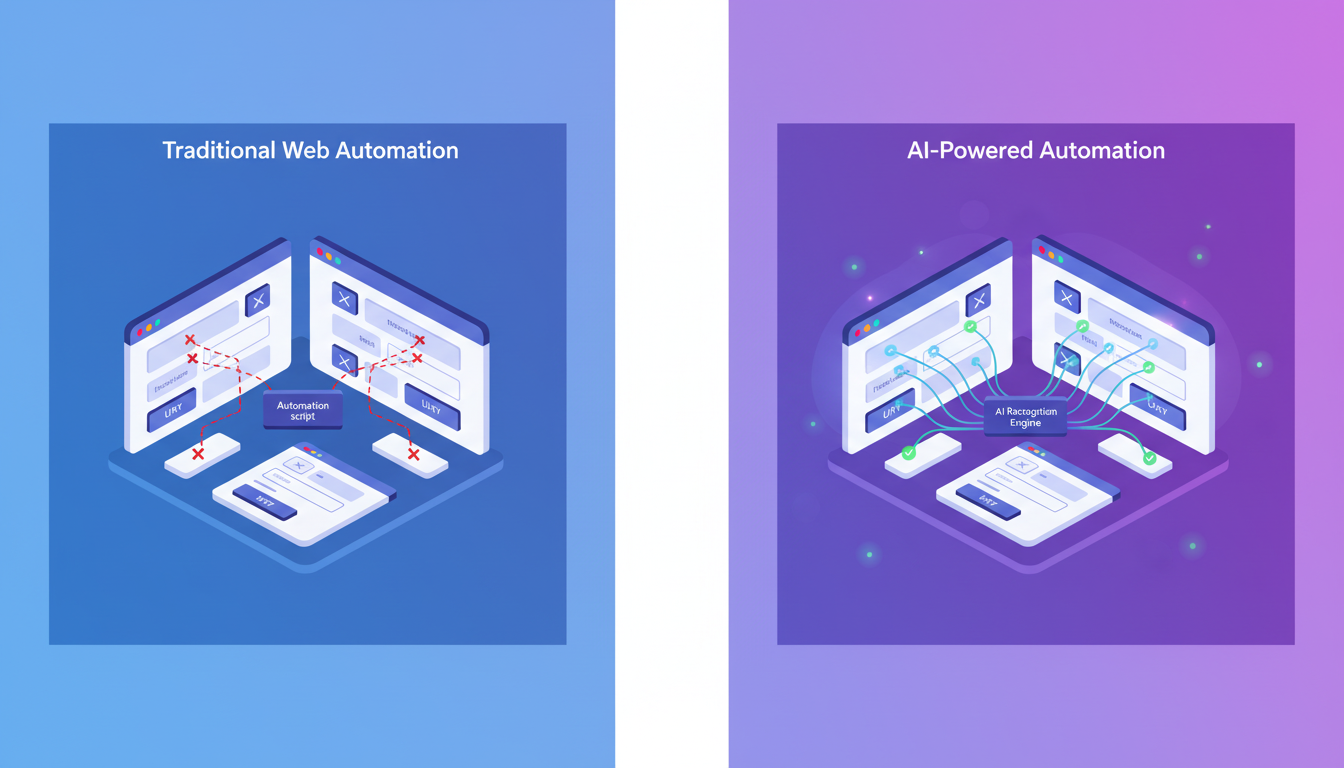
AI flips that relationship. Instead of rigid XPath lookups, newer agents use visual element recognition to identify buttons, fields, and links the way a human would, by what they look like and where they sit on the page. When a site redesigns its layout, the agent adapts without throwing an exception at 2 AM.
A few capabilities are driving this shift:
- Self-healing locators that detect broken selectors and automatically find the correct element using contextual clues, reducing overnight failures without manual intervention
- Natural language task input, where you describe what you want done and the agent figures out the click-by-click sequence on its own
- Flexible workflow adaptation that adjusts mid-run when pages load differently or present unexpected modals
- Multi-step agentic execution that chains actions across tabs and sites without pre-scripted flows
The practical difference? A Selenium script needs you to map every interaction in advance. An AI web automation agent interprets intent. You say "update this deal in Salesforce and log the notes in Notion," and it plans the route itself. That is a fundamentally different contract between user and tool, one where the human states the goal and the software owns the execution path.
Web Automation Best Practices for Reliability and Scale
Even the best-designed framework falls apart without disciplined execution habits. These practices keep your automation suite reliable as it grows.
- Use explicit waits instead of hard-coded sleep timers. Wait for a specific element state (visible, clickable, present in DOM) instead of guessing how long a page needs to load.
- Isolate test data. Each run should create its own data or pull from a dedicated fixture, so tests never depend on state left behind by a previous execution.
- Log generously. Capture screenshots on failure, write structured logs with timestamps, and tag each run with environment metadata. When something breaks at 3 AM, your logs are the only witness.
- Run cross-browser checks in parallel, not sequentially. Playwright and Selenium Grid both support this natively, cutting feedback time dramatically.
- Handle authentication with stored session cookies or API-based login instead of driving through a UI login flow every single run. It's faster and far less flaky.
Flakiness is the silent killer of automation trust. If your team stops believing test results, they stop looking at them. Retry logic can mask symptoms, but the real fix is stable selectors, proper waits, and tests that own their own data from setup to teardown.
Security and Compliance Considerations
Automating browser workflows means your scripts interact with the same sensitive data you do: login sessions, customer records, financial dashboards. That raises real questions about where data flows and who can access it.
A few non-negotiable practices:
- Never hardcode credentials. Use secret managers or environment variables, and rotate tokens on a schedule.
- Respect robots.txt and terms of service. Automated scraping that violates either can trigger IP bans or legal exposure.
- Audit every automated action. In compliance-heavy industries, you need timestamped logs showing what was accessed, changed, and by which process.
- Vet your AI providers' data retention policies. If an agent sends page content to an LLM for interpretation, confirm that the subvendor does not retain or store that data.
The local vs. cloud execution choice matters here too. Cloud-based agents process actions on remote servers, which introduces third-party data exposure and complicates compliance reviews. Local execution keeps actions inside your own browser on your own device, sidestepping many of those concerns. For enterprise teams picking web automation tools, SOC 2 Type 2 compliance from the vendor should be table stakes, not a nice-to-have.
How Composite Changes Browser Automation for Knowledge Workers
Most of the tools covered in this guide require you to write code, maintain selectors, and debug scripts when sites change. That works for QA teams. It doesn't work for the sales rep toggling between Salesforce and LinkedIn, or the recruiter compiling candidate profiles across four job boards.
Composite takes a different approach. You press Cmd + Shift + Space, describe what you need in plain English, and the agent plans and executes the workflow in your existing browser. No scripts, no API connectors, no browser migration. It runs locally on your device, using your logged-in sessions, so sensitive data never passes through remote cloud environments. Our AI subvendors maintain zero data retention, and we hold SOC 2 Type 2 compliance for teams where that matters.
Because Composite uses a multi-model architecture with visual element recognition, it handles the shifting interface problems that snap traditional Selenium selectors in half. CRM updates, cross-tool data syncing, research synthesis, Jira triage: if the task follows a pattern inside a browser, you describe the goal and Composite owns the execution.
Final Thoughts on Making Browser Automation Work for You
The gap between what browser automation tools promise and what they deliver often comes down to who has to maintain them. Code-based frameworks give you precision but demand ongoing script updates every time a site changes, while AI agents adapt to interface changes without breaking your entire workflow. Your decision should match your team's technical depth and the kinds of tasks you're automating. If you're tired of writing selectors or just want to see how natural language task execution actually works in practice, reach out and we'll show you what Composite does differently.
FAQ
How is AI-powered web automation different from traditional tools like Selenium?
Traditional tools rely on hardcoded selectors that break when developers change a CSS class or move a button. AI-powered automation uses visual element recognition to identify elements the way humans do, adapting when sites redesign layouts instead of throwing errors.
Can web automation tools access my existing logged-in sessions?
Local execution tools like Composite run inside your existing browser and use your active sessions, avoiding re-authentication. Cloud-based automation tools execute on remote servers and typically require API keys or OAuth setup to access your accounts.
What's the fastest way to get started with web automation if I don't code?
Browser-native agents that accept plain-English instructions let you automate workflows without writing scripts. Press a keyboard shortcut, describe your task (like "update this CRM record and log it in my tracker"), and the agent executes the workflow in your existing browser.
Which web automation framework should I choose for cross-browser testing?
If you need Safari coverage, use Selenium WebDriver or Playwright. For Chrome-only projects with JavaScript teams, Puppeteer offers simplicity. Playwright delivers the fastest performance for end-to-end testing across Chromium, Firefox, and WebKit.
How do I prevent my automation scripts from breaking every time a website changes?
Use explicit waits for specific element states instead of sleep timers, implement the Page Object Model to isolate locators in reusable components, and consider AI-powered tools with self-healing locators that automatically adapt to layout changes.