Task Automation: The Complete Guide for April 2026
You toggle between tabs, pull numbers from one tool, paste them into another, then repeat the same sequence tomorrow. That pattern, the one eating 5+ hours of your week according to recent studies, is why task automation tools exist. But here's what most guides won't tell you: the automation approach that works for single-app tasks falls apart completely once you're coordinating work across your entire browser. If your workflows span LinkedIn, your CRM, Slack, and a project tracker, you need a different model entirely.
TLDR:
- Task automation handles repetitive browser work like data entry, syncing tools, and research
- 94% of workers do repetitive tasks; 54% could save 5+ hours weekly with automation
- AI agents adapt to UI changes and interpret unstructured data, unlike rigid scripts
- Browser-based tools automate multi-tab workflows without APIs or switching browsers
- Composite runs locally in Chrome/Edge/Brave, executing tasks via plain-language commands
What Is Task Automation
Task automation is the practice of using software to handle repetitive, rule-based work that you'd otherwise do manually. Think copying data between apps, updating spreadsheets, sending follow-up emails, or syncing records across tools. If you find yourself doing the same sequence of clicks and keystrokes multiple times a week, that's a task worth automating.
For knowledge workers, most of this repetition lives inside the browser, which is why browser automation tools have become indispensable. You toggle between tabs, pull numbers from one app, paste them into another, then repeat. Task automation software watches for those patterns and runs them on your behalf, freeing you to spend time on work that actually requires your judgment.
The Business Case for Task Automation
The numbers tell a clear story. According to ElectroIQ, 94% of workers report performing repetitive, time-consuming tasks that could be partially or fully automated. That's nearly everyone.
What does all that repetition actually cost? Research from Breeze found that 54% of workers believe automation could save them more than five hours every week. Multiply that across a team of 20 and you're looking at 100+ recovered hours per week, time that could go toward strategy, relationship-building, or creative problem-solving instead of copy-paste busywork.
For decision-makers weighing whether to invest in task automation tools, even modest time savings per employee compound quickly across departments. The ROI shows up as faster deal cycles for sales teams, quicker candidate pipelines for recruiters, and fewer manual errors in operations. When the cost of doing nothing is measured in thousands of lost hours per quarter, the business case makes itself.
Types of Tasks You Can Automate
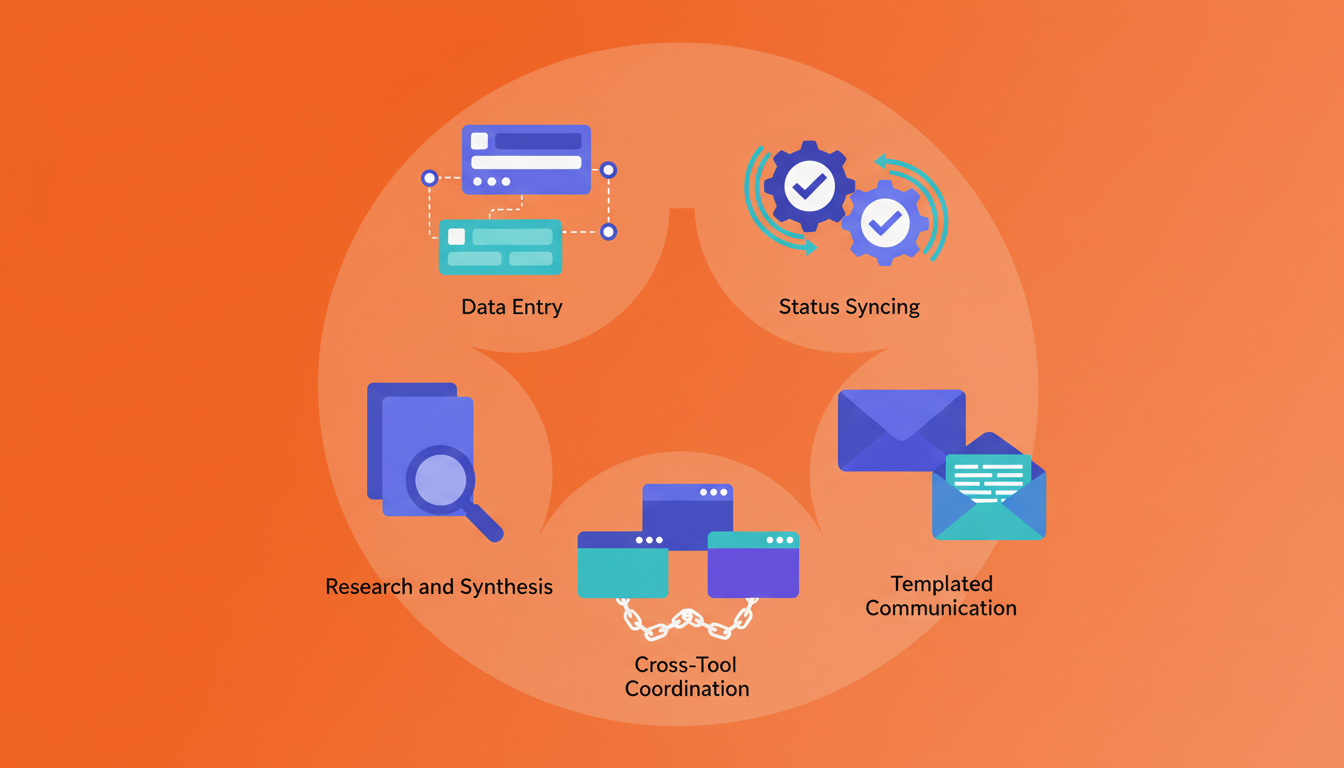
Most automatable work falls into a handful of recurring patterns, regardless of your role:
- Data entry and migration: copying information between apps, updating CRM records, or filling out forms from existing documents
- Status syncing: keeping project trackers, dashboards, and shared docs aligned whenever source data changes
- Research and synthesis: pulling information from multiple websites and compiling it into summaries or comparison tables
- Templated communication: drafting follow-up emails, outreach messages, or status updates that follow a predictable structure
- Cross-tool coordination: chaining actions across your SaaS stack, like turning a Slack message into a Jira ticket with the right labels attached
If a task follows a repeatable sequence and doesn't require judgment-heavy decisions at every step, it's a strong candidate for automation.
Task Automation Examples Across Professional Roles
What does task automation look like in practice? Here are multi-step workflows that different professionals run daily.
- Sales reps research a prospect across LinkedIn and their company site, pull relevant details into a CRM contact record, then draft a personalized outreach email referencing recent news.
- Recruiters search multiple job boards for candidates matching a role's criteria, compile profiles into a comparison table, and draft individualized messages for top matches.
- Product managers pull open tickets from Jira, cross-reference them against a product roadmap in Notion, flag duplicates, and post a ranked summary to Slack.
- Operations teams gather weekly metrics from three or four dashboards, synthesize them into a single report, and distribute it to stakeholders via email.
Notice the common thread: each example chains actions across multiple tools and tabs. A single click or a single app isn't the bottleneck. The bottleneck is the glue work between them.
How AI Is Changing Task Automation
Traditional automation tools relied on rigid, rule-based scripts. If a button moved or a page layout changed, the whole workflow broke. AI flips that model. Instead of following hardcoded instructions, AI agents interpret what's on screen, adapt to UI changes, and make judgment calls based on unstructured data like emails, web pages, and documents.
That shift is already measurable. According to Breeze, 39% of enterprise users applied AI-driven prioritization and auto-scheduling features in 2024, and adoption is accelerating. AI browser agents handle the messy middle ground that old-school automation couldn't touch: reading context across tabs, deciding which information matters, and chaining actions across tools without predefined connectors.
The real unlock isn't speed. It's that AI can automate tasks you never would have scripted in the first place, because they required too much context to reduce to a simple rule.
Step-by-Step Guide to Implementing Task Automation
Getting started doesn't require a full-scale rollout. A measured approach works better.
- Audit your week. Track which tasks you repeat most often and how long each takes. Anything you do more than three times a week in your browser is worth flagging.
- Pick one low-stakes workflow. Choose something with a clear sequence and minimal consequences if it goes wrong, like syncing meeting notes into a project tracker.
- Match the tool to your comfort level. If you're non-technical, look for tools that accept plain-language instructions instead of requiring scripts or code.
- Run a pilot. Automate that single workflow for one to two weeks. Note time saved, errors caught, and anything the automation handled incorrectly.
- Iterate, then expand. Refine the workflow based on what you learned, then layer in a second task. Scaling gradually keeps quality high and prevents the "automate everything at once" chaos that derails most rollouts.
Task Automation Tools and Approaches
Not every automation approach solves the same problem. The right fit depends on how many tools you touch, how technical your team is, and where your workflows actually run.
Approach | Best For | Setup Complexity | Cross-Tool Reach |
|---|---|---|---|
Single-app automation (e.g., Notion AI, Excel macros) | Tasks confined to one tool | Low | None |
Workflow connectors (e.g., Zapier, Make) | Linking two or three apps via triggers | Medium | Moderate, API-dependent |
RPA systems (e.g., UiPath, Automation Anywhere) | Legacy desktop apps, structured processes | High | Broad but brittle |
Browser-based AI agents | Multi-tab, multi-site professional workflows | Low | Wide, no APIs needed |
If your work stays inside a single app, built-in automation is usually enough. Once you're chaining actions across four or five tabs, connector tools hit their limits fast because every app needs an available API integration. RPA handles desktop software well but demands dedicated setup and maintenance. Browser-based AI agents sit in a sweet spot for knowledge workers: they operate inside your existing browser sessions, adapt to UI changes, and require no code or API configuration to get running.
Common Challenges When Automating Tasks
Automation projects stall for predictable reasons. Knowing them upfront saves you weeks of frustration.
- Integration complexity: Many tools lack open APIs, so connecting them requires workarounds or middleware that breaks when either app updates.
- Change management resistance: Teams accustomed to manual processes often distrust automation outputs, especially when they can't see what's happening behind the scenes.
- Over-automating: Not every task deserves a workflow. Automating something that requires human nuance, like sensitive client communication, creates more cleanup than it saves.
- Unclear success metrics: Without a baseline measure of time spent or error rates before automation, it's nearly impossible to prove value afterward.
The common thread? Most failures aren't technical. They're scoping problems. Start narrow, measure before and after, and give your team visibility into what the automation is actually doing. Transparency builds trust faster than any demo.
Security and Compliance Considerations for Task Automation
Any automation tool that touches your browser sessions raises fair questions from IT and security teams. Where does the data go? Who stores it? Can credentials be extracted?
These concerns are the top reason automation projects get blocked before they start. When choosing task automation software, focus on three things:
- Credential handling: Does the tool extract or store your passwords, or does it ride on existing logged-in sessions? Local execution within your own browser avoids the need to hand over API keys or OAuth tokens.
- Data retention with AI providers: Ask whether the vendor's AI subvendors retain or train on your data. At Composite, our AI subvendors maintain zero data retention, and we hold SOC-2 Type 2 compliance.
- Audit and control: Look for features like explicit user confirmation on high-risk actions, website blocklists, and opt-out data collection so your team stays in control.
Cloud-based or headless automation agents run in remote environments, which introduces a whole extra layer of IT approval. Tools that execute locally on your device sidestep much of that friction, because the data never passes through a third-party browser instance.
Measuring Task Automation Success
Time saved is the obvious metric, but not the only one worth tracking. According to ElectroIQ, 76% of companies using marketing automation report a positive ROI within 12 months, and much of that return comes from gains you won't find on a stopwatch.
Metrics worth measuring alongside hours recovered:
- Error reduction: how many manual data entry mistakes disappeared after automation took over a given workflow?
- Process cycle time: did a task that took two days now close in four hours?
- Employee satisfaction: are people spending more of their week on work they actually want to do?
- Scaling capacity: can your team handle a growing workload without a proportional headcount increase?
If you only measure speed, you miss the compounding effects. A recruiter who automates candidate research saves 30 minutes per search, but they also produce more consistent evaluations, respond to hiring managers faster, and avoid the fatigue driven mistakes that creep in after the fifteenth LinkedIn tab of the day.
Browser-Based Task Automation for Knowledge Workers
Most knowledge work already lives in the browser. Email, CRMs, project trackers, spreadsheets, research: it's all running in tabs. That makes the browser the most logical place to automate.
Composite works inside Chrome, Edge, or Brave as a lightweight extension. Hit Cmd/Ctrl + Shift + Space, describe what you need in plain English, and Composite plans and executes the workflow across your open tabs. No APIs, no connectors, no browser migration. It rides on your existing logged-in sessions, so there's nothing to re-authenticate. Over time, proactive AI assistants learn your patterns and surface repetitive tasks before you think to ask.
Because everything executes locally on your device, the security model stays clean. Our AI subvendors maintain zero data retention, and we're SOC-2 Type 2 compliant, which gives IT teams fewer reasons to say no.
Final Thoughts on Making Task Automation Work
The best task automation examples come from professionals who started by tracking what they actually repeat, not what they think sounds impressive to automate. You probably already know which tasks drain your week without adding real value. Automating those first gives you proof of concept and momentum to tackle bigger workflows. Talk to our team if you want help identifying where to start.
FAQ
How long does it take to implement task automation for a professional workflow?
Most people can automate their first workflow in under an hour by starting with a single, low-stakes task they repeat weekly. Full optimization across multiple workflows typically takes one to two weeks as you learn which patterns deliver the best time savings and refine your approach based on real results.
What's the difference between traditional RPA tools and browser-based AI agents?
Traditional RPA tools execute in remote environments, require complex setup, and break when UI elements change. Browser-based AI agents run locally inside your existing browser sessions, adapt to layout changes using vision models, and require no API configuration or IT approval for new browser installations.
When should I automate a task versus keeping it manual?
Automate tasks you perform more than three times per week that follow a repeatable sequence across your browser tabs, like updating CRM records, syncing project trackers, or compiling research from multiple sites. Keep tasks manual when they require careful judgment at every step, like sensitive client negotiations or strategic decision-making.
Can task automation tools access my passwords and credentials?
It depends on the tool's architecture. Cloud-based automation agents often require API keys or OAuth tokens, creating credential exposure risks. Local-execution tools like Composite operate within your existing logged-in browser sessions without extracting or storing passwords, which reduces security concerns and speeds up IT approval.
Why do AI-driven automation tools handle cross-tool workflows better than traditional connectors?
Connector tools like Zapier depend on pre-built API integrations between specific apps, so they break when an app lacks an API or updates its structure. AI agents read what's on screen, interpret unstructured content across any website, and adapt to UI changes without requiring API access or custom connectors for each tool.