15 Best Browser Automation Tools for Sales Prospecting in March 2026
Sales reps lose hours every week doing the same browser routine for each prospect: copy from LinkedIn, paste to CRM, research the company, draft an email referencing what you found. What if your browser just did that entire sequence for you across every site involved? That's what browser automation for sales prospecting delivers, cutting those 15-minute manual workflows down to seconds. The 15 tools below tackle different parts of the problem, from basic scrapers to agents that handle your complete prospecting stack.
TLDR:
- Browser automation cuts 15-minute prospecting tasks to under 60 seconds across LinkedIn, CRMs, and research sites
- Local execution tools use your existing browser sessions and avoid website blocks that hit cloud options
- AI-powered agents adapt to layout changes and interpret pages dynamically versus fixed scripts that break
- Composite executes multi-step sales workflows in your browser with Cmd+Shift+Space using plain English commands
- Zero data retention with AI subvendors and SOC-2 Type 2 compliance clear enterprise security reviews
What Browser Automation Is and Why Sales Teams Use It
Browser automation lets software control your web browser to complete repetitive tasks across any website. Sales teams use it to automate prospecting workflows that span LinkedIn, CRMs, company research sites, and email tools without switching tabs or copying data manually.
Unlike sales software locked to specific integrations, browser automation works anywhere your browser can access. The workflow runs automatically across multiple tools, cutting 15-minute manual processes down to seconds.
How Browser Automation Changes Sales Prospecting Workflows
Sales reps spend 64% of their time on tasks like copying LinkedIn data to CRMs, researching company details, and drafting emails. Browser automation collapses these multi-step workflows into single commands across all your tools.
A typical prospecting sequence pulls contact info from LinkedIn, enriches it with company data, logs everything to Salesforce, then drafts personalized outreach referencing recent funding or job changes. What takes 15 minutes manually runs in under 60 seconds automated, giving reps hours back each day for actual conversations and closing deals.
15 Browser Automation Tools for Sales Prospecting
Here are 15 browser automation options that sales teams use for prospecting work. Each serves different needs, from lightweight Chrome extensions to full autonomous sales agents.
1. Composite
Composite automates any browser task across your entire web stack. Sales reps invoke it with Cmd+Shift+Space, describe what they need in plain English, and it executes multi-step workflows across LinkedIn, CRMs, research sites, and email tools. Runs locally in your existing browser without switching tools or requiring API connections.
2. Browserbase
Cloud-based headless browser infrastructure for running automated scraping and data collection tasks. Handles session management and proxy rotation for teams building custom prospecting scripts.
3. Browser Use
Open-source Python library that controls browsers through code. Requires developer resources to build and maintain custom automation workflows for prospect research and data entry.
4. Selenium
The oldest browser automation framework, originally built for testing. Sales ops teams use it to script repetitive data transfers between tools, though setup demands technical expertise.
5. Puppeteer
Google's Node.js library for controlling Chrome programmatically. Teams with engineering support build custom prospecting automations for scraping company data and enriching lead records.
6. PhantomBuster
Pre-built automation templates for LinkedIn, Twitter, and Sales Navigator. Extract prospect lists and engagement data without coding, though limited to supported sites.
7. Bardeen
Chrome extension offering workflow automation through a visual builder. Connect LinkedIn actions to Google Sheets or CRMs using pre-made templates for common prospecting tasks.
8. Zapier Chrome Extension
Triggers Zapier workflows from browser actions. Captures web data and sends it to your sales stack, though each connection requires separate zap configuration.
9. Axiom
No-code browser bot builder for scraping and data entry. Create custom automations that click through prospect research workflows and export results to spreadsheets.
10. Browse AI
Monitors websites for changes and extracts data into structured formats. Sales teams track competitor pricing, job postings, and funding announcements to trigger outreach.
11. Instant Data Scraper
Simple Chrome extension that auto-detects lists on web pages. Exports prospect data from directories and search results to CSV files with one click.
12. TaskMagic
Records your browser actions and plays them back as automations. Replicates manual prospecting sequences across multiple leads without writing code.
13. Artisan AI
Autonomous SDR that researches prospects and sends outbound emails. Operates independently instead of automating your browser, functioning as a separate team member.
14. 11x AI
AI sales agent that handles full prospecting cycles from research to outreach. Works outside your browser as a standalone system instead of augmenting your existing tools.
15. Relay.app
Workflow automation with browser extension support. Chains together actions across web apps using a visual interface, though requires mapping each step manually.
Tool | Execution Method | Technical Setup Required | Best For | Key Limitation |
|---|---|---|---|---|
Composite | Local browser with AI agents | None - works with Cmd+Shift+Space in existing browser | Multi-step prospecting workflows across any web tool using natural language | Requires active browser session |
Browserbase | Cloud headless browsers | API integration and custom scripting | High-volume scraping operations with managed infrastructure | May trigger website anti-bot detection |
Browser Use | Local via Python library | Developer resources to write and maintain Python code | Custom automation workflows requiring programmatic control | Ongoing technical maintenance required |
Selenium | Local or cloud via code | Extensive technical setup and script development | Teams with engineering support building complex custom automations | Scripts break with page updates |
Puppeteer | Local via Node.js | JavaScript/Node.js development expertise | Engineering teams building Chrome-specific data extraction pipelines | Chrome-only, requires constant script updates |
PhantomBuster | Cloud with pre-built templates | Minimal - select templates and configure | Standard LinkedIn and Sales Navigator extractions | Limited to pre-built templates and supported sites |
Bardeen | Local Chrome extension | Visual workflow builder setup | Simple prospecting tasks with pre-made templates | Template-based limitations on custom workflows |
Zapier Chrome Extension | Cloud triggers | Configure separate Zaps for each connection | Connecting browser data capture to existing Zapier workflows | Each workflow requires individual Zap configuration |
Axiom | Local Chrome extension | Visual bot builder with no-code interface | Scraping prospect data and automating form fills | Limited to browser-based actions only |
Browse AI | Cloud monitoring | Configure data extraction rules per site | Monitoring competitor sites and extracting structured data | Passive monitoring instead of active workflow execution |
Instant Data Scraper | Local Chrome extension | None - one-click operation | Quick extraction of list data from directories | Basic scraping only, no multi-step workflows |
TaskMagic | Local with recording playback | Record workflows once, replay multiple times | Replicating exact manual sequences across multiple leads | Recorded actions break when sites change |
Artisan AI | Standalone AI agent | System onboarding and configuration | Autonomous prospecting as separate team member | Operates outside your browser and existing tools |
11x AI | Standalone AI system | System setup and training | End-to-end prospecting cycles managed independently | Separate system instead of browser augmentation |
Relay.app | Cloud with browser extension | Visual workflow mapping for each sequence | Chaining actions across web apps with conditional logic | Manual step mapping for each workflow |
Key Capabilities to Look for in Browser Automation Tools
When choosing a browser automation tool for sales prospecting, start with workflow flexibility. The best solutions execute multi-step tasks across different websites without custom integrations for each source.
AI capabilities matter for reliability. Tools that adjust to layout changes and handle errors autonomously complete tasks when basic automation breaks, especially since most websites update quarterly.
Execution method affects both security and speed. Local browser execution uses your existing sessions and credentials, while cloud options may trigger security blocks despite offering scale advantages.
Local Execution vs. Cloud-Based Browser Automation
Local execution runs automation directly in your browser, using the tabs and logins you already have open. Cloud-based tools operate on remote servers, spinning up separate browser instances that websites often flag as suspicious.
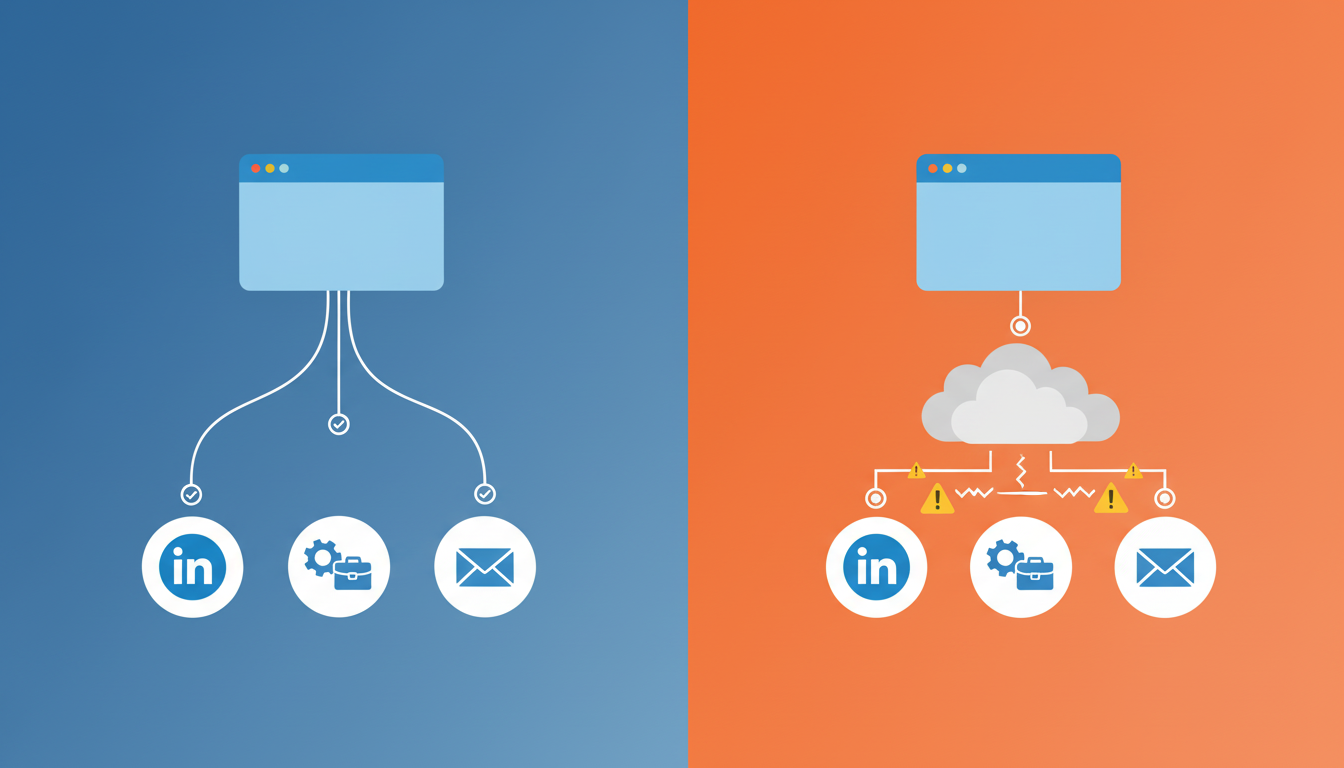
Security and IT approval differ between these approaches. Local execution needs no new credentials since it works with your existing sessions. Cloud options require passing login tokens to external servers, raising data governance concerns that slow enterprise adoption.
Website blocking hits cloud automation hard. Remote browser fingerprints trigger anti-bot defenses on LinkedIn and most sales tools. Local execution appears identical to your normal browsing, avoiding detection entirely.
Browser Automation Security and Compliance Considerations
Enterprise IT teams block browser automation tools that extract credentials or send sensitive prospect data to third-party servers. The approval process hinges on three questions: where does execution happen, how are credentials managed, and what data retention policies govern AI processing.
Local execution solves the first two concerns. Actions run in your existing browser using sessions you're already logged into, so no credentials pass to external systems. AI-powered automation introduces a third variable: what happens to your prospect data after the AI processes it? Zero data retention policies with AI subvendors close this gap, letting you automate prospecting workflows without waiting months for legal review.
Integration with CRM and Sales Engagement Platforms
Browser automation bridges disconnected sales tools without native integrations. Instead of API connections between specific apps, it manipulates any web interface your browser can access, moving data between Salesforce, LinkedIn, Outreach, and research sites the same way you would manually.
Sales teams reclaim 15+ hours weekly by eliminating copy-paste work. Prospect details flow from LinkedIn to CRM fields, company research populates opportunity notes, and email drafts pull context from multiple sources automatically.
How AI Powers Browser Automation for Prospecting
AI converts browser automation from fixed sequences into adaptive agents that interpret page structure on the fly. Vision models identify elements by appearance, while LLMs translate instructions into actions that work across any site without predefined scripts for each interface.
This shift means automation survives website redesigns. When buttons move or menus change, AI-powered agents locate the correct element by context without breaking like traditional scripts. 81% of sales teams now use or test AI sales tools, with adopters 1.3x more likely to hit revenue growth.
Multi-model architectures split tasks by complexity. Lightweight models execute simple clicks and form fills. Heavier vision models handle spatial layouts in CRMs and spreadsheets where pixel-perfect recognition matters.
Common Use Cases for Browser Automation in Sales
Sales teams automate four core prospecting workflows. First, multi-source research pulls prospect background from LinkedIn, company sites, and funding databases into a single view. Second, CRM enrichment updates contact records with job changes, tech stack data, and firmographic details without manual entry.
Third, personalized outreach drafting synthesizes research into email copy that references specific triggers like funding rounds or executive hires. Fourth, competitive monitoring tracks pricing pages, job postings, and press releases to surface accounts entering buying windows.
Choosing Between Specialized Tools and General Browser Agents
Specialized sales prospecting tools offer pre-built workflows for LinkedIn extraction, email finding, and CRM enrichment. They work immediately without configuration, but only automate the specific scenarios their templates cover. When your workflow deviates from their predetermined paths, you're back to manual work.
General browser agents execute any task you describe across any website. They adapt to your unique sales process instead of forcing you into preset sequences.
Choose specialized tools when your prospecting follows standard patterns and stays within their supported sites. Pick general agents when your workflow spans custom research sources, internal tools, or processes that change frequently.
How Browser Automation Complements Traditional Sales Tools
Traditional sales tools pull data from APIs and prebuilt databases. Outreach connects to Salesforce through API. ZoomInfo maintains its own contact database. These work well for standardized data, but break when you need information from websites without APIs or database entries.
Browser automation fills this gap by accessing any site your browser can reach. When you need details from a prospect's custom pricing page, internal company blog, or regional news site, your sales stack can't help. Browser automation pulls that information and routes it wherever you need it.
The relationship is additive. Your CRM stores the data. Your engagement tool sends the emails. Browser automation becomes the connective layer that gathers context from everywhere else and populates your existing tools.
Implementation and Adoption Best Practices
Start with one repetitive workflow that eats hours weekly. Pick prospect research or CRM updates where your team already complains about manual work. Automate that single task, measure the time saved, and let early wins build momentum.
Track actual minutes recovered per rep per week. Hard numbers convince skeptics faster than promises. When the team sees real time returning to their calendars, adoption spreads naturally.
Expand gradually after your first workflow runs reliably. Add a second use case once reps stop thinking about the first one. Build internal documentation as you go, capturing the specific prompts or commands that work best for your sales process.
Measuring ROI from Browser Automation
Track time saved per rep first, but don't stop there. Measure how those recovered hours convert to revenue activities. Count discovery calls booked, proposals sent, and deals progressed that wouldn't have happened when reps were buried in data entry.
Activity velocity reveals automation's real impact. Compare prospect touches per week before and after implementation. If automation adds three hours daily but activity volume stays flat, reps aren't redeploying that time to selling.
Pipeline metrics close the loop between automation and revenue. Track whether accounts researched through automation convert at higher rates than manual prospecting. Monitor deal cycle length for opportunities where automated research informed early conversations. The ROI calculation becomes clear when you connect minutes saved to deals closed.
The Evolution from Scripts to Autonomous Sales Agents
Browser automation started with Selenium scripts that clicked fixed coordinates and broke with every page update. Sales ops teams spent more time maintaining scripts than the automation saved.
The next generation added selectors that survived minor layout changes. Tools like Puppeteer let developers write more resilient automations, though each workflow still required custom code for every site and scenario.
AI agents changed the equation. Vision models interpret page structure dynamically, and LLMs translate instructions into action sequences that adapt across different interfaces. Instead of scripting every click path, you describe the outcome and the agent figures out how to get there.
How Composite Brings Browser Automation to Sales Teams
We built Composite for sales teams who need browser automation that works across their entire prospecting stack without IT headaches. Invoke it with Cmd+Shift+Space, describe your task in plain English, and watch it execute sequences across LinkedIn, your CRM, research sites, and email tools using your existing logged-in sessions.
Composite runs locally in your browser, so website blocks don't apply. Our multi-model architecture routes simple tasks to fast open-source models while using vision models for complex CRM layouts, balancing speed with reliability.
SOC-2 Type 2 compliance and zero data retention with AI subvendors clear enterprise security reviews that stall other automation tools for months.
Final Thoughts on Browser Automation in Sales
You already know which prospecting tasks waste your team's time. Browser automation turns those 15-minute sequences into 60-second executions across every tool you use. The trick is starting small with one workflow that everyone hates, proving the time savings with actual numbers, and expanding from there. Your CRM, LinkedIn, and research sites work the same way, they just stop requiring manual bridges between them.
FAQ
How does browser automation differ from traditional sales prospecting tools?
Traditional sales tools pull data from APIs and prebuilt databases, working only with supported platforms. Browser automation accesses any website your browser can reach, extracting information from custom pricing pages, company blogs, and regional news sites that aren't in any database or API.
Can I use browser automation tools without getting blocked by LinkedIn and CRMs?
Local execution tools run directly in your existing browser using your logged-in sessions, appearing identical to manual browsing. Cloud-based tools operate on remote servers that websites flag as suspicious, triggering anti-bot defenses on LinkedIn and most sales platforms.
What's the difference between AI-powered browser automation and script-based tools like Selenium?
Script-based tools click fixed coordinates and break when pages update, requiring constant maintenance. AI-powered agents interpret page structure dynamically using vision models and LLMs, adapting to layout changes automatically without custom code for each site.
How do I measure ROI from browser automation beyond time saved?
Track activity velocity (prospect touches per week), discovery calls booked, and proposals sent with the recovered time. Compare conversion rates and deal cycle length for opportunities where automation informed research: connecting minutes saved to deals closed shows real revenue impact.
Will IT approve browser automation tools that need access to our CRM and prospect data?
Local execution tools that run in your existing browser sessions don't extract credentials or require new logins, clearing the first security hurdle. Look for SOC-2 Type 2 compliance and zero data retention policies with AI subvendors to avoid months-long legal reviews for enterprise approval.